PEGASUSMU ONLINE DEVELOPMENT
06 / PEGASUS KNOWLEDGE BASE

Guides & documentation.

Helpful articles about Pegasus features, setup and security.

ARTICLES
SECURITY / PEGASUS 5.2.4

PEGASUS 5.2.4 — SECURITY & ANTIVIRUS NOTICE

PEGASUS DEVELOPMENT TEAM · SECURITY

A clarification regarding antivirus detections and Themida protection.

We would like to address concerns regarding antivirus warnings that may appear when downloading or running the Pegasus MU Online client.

To protect our software, intellectual property, and proprietary development work from unauthorized modification and reverse engineering, Pegasus uses Themida, a commercial software protection solution.

Themida applies advanced executable protection techniques, which may trigger heuristic or machine-learning-based detections from certain antivirus engines.

VirusTotal Comparison

Original Client (Before Themida)1/6115.72 MB0d148d12c619409c8eb57d022e6b33724380c816a97ba5d64fa39a4922123238
Protected Client (After Themida)12/698.59 MB8d20f6463ddc465c0641d64ae464fb9ec24ee252be3886e5d2ee8c9a44530068

The significant difference between these results suggests that the protection process is contributing to the additional antivirus detections. However, antivirus detections should not automatically be considered false positives solely because Themida is being used.

Our Commitment to Transparency

We understand that security is important to every server owner and player.

Pegasus will continue reviewing antivirus compatibility, investigating reported detections, and improving our software distribution process.

We encourage customers to review the available scan results and contact us directly if they encounter security warnings.

Software protection is important to us, but so are transparency, customer trust, and security.

Thank you for your continued trust and support.

— Pegasus Development Team
MIX SYSTEM / PEGASUS

PEGASUS — CUSTOM MIX SYSTEM & CONFIGURATION

PEGASUS DEVELOPMENT TEAM · CUSTOM MIX

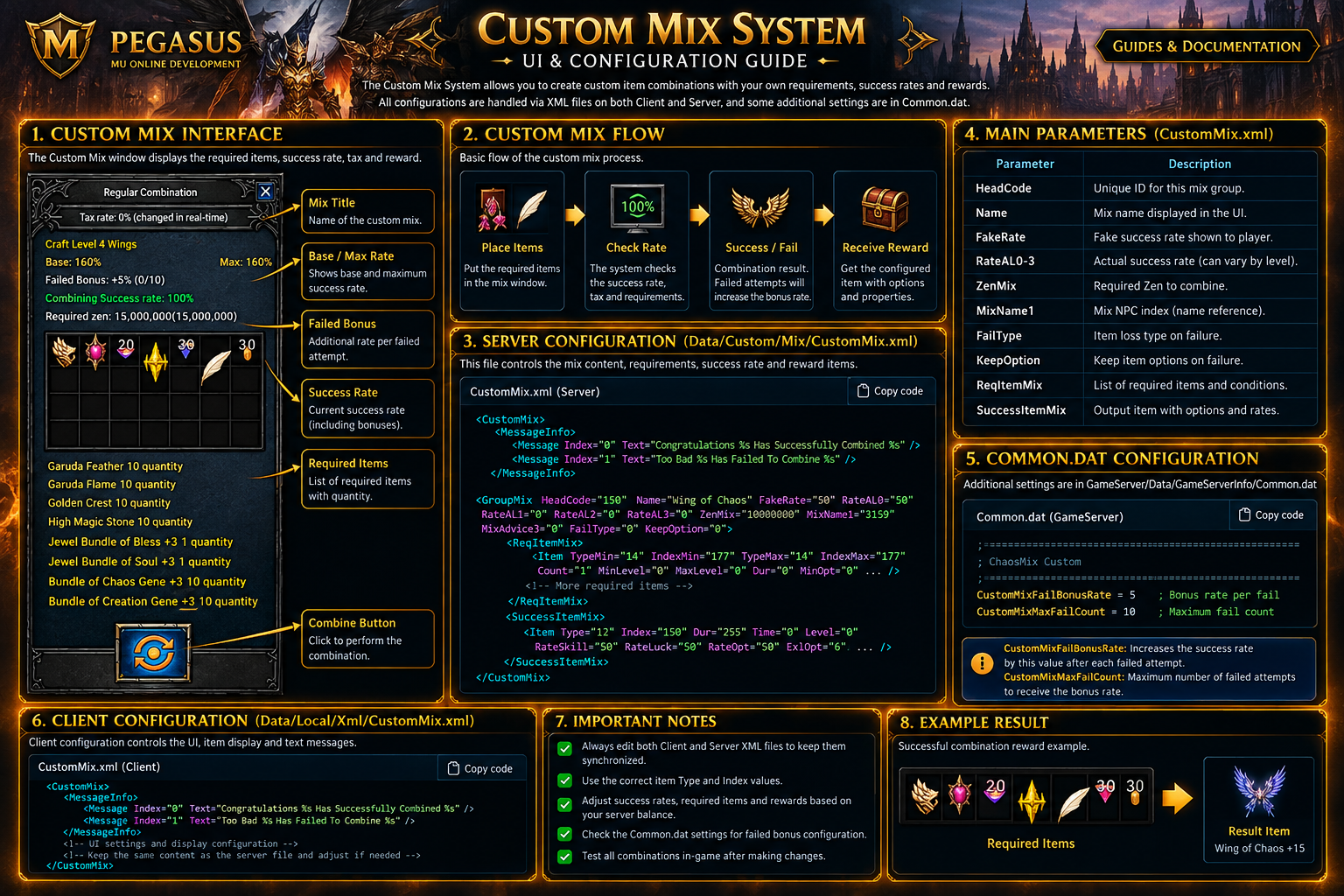
Create custom combinations with required materials, Zen costs, success rates and rewards. Failed attempts can contribute a configurable bonus.

1. Custom Mix interface

Pegasus Custom Mix illustrated overview
Custom Mix — illustrated configuration overview

2. Server configuration

Server/Data/Custom/Mix/CustomMix.xml

GroupMix defines each recipe. ReqItemMix lists the materials, while SuccessItemMix defines possible rewards. MessageInfo contains the success and failure messages.

XML · CustomMix.xml

3. GameServer settings — Common.dat

GameServer/Data/GameServerInfo/Common.dat
INI · Common.dat

CustomMixFailBonusRate sets the bonus rate for failed attempts; CustomMixMaxFailCount limits the number of failed attempts counted. The screenshot shows +0% (0/10) with these settings.

4. Main XML parameters

GroupMix

HeadCode identifies a recipe, Name labels it, ZenMix specifies the Zen cost, and FakeRate / RateAL0–3 are rate-related fields.

ReqItemMix

Required materials: item type/index ranges, Count, levels, options and other conditions.

SuccessItemMix

Output item type/index and reward properties, including SuccessRate for listed outputs.

MessageInfo

Localized messages for successful and failed combinations.

5. Configuration notes

Back up the XML and Common.dat before editing. Validate the XML and test the recipe in-game, including success, failure, costs and rewards. Exact behavior of rate fields must be confirmed in the server implementation.

OPTIONAL PLUGIN / PEGASUS

PEGASUS — DUNGEON SYSTEM

PEGASUS DEVELOPMENT TEAM · DUNGEON PLUGIN
IMPORTANT — SEPARATELY PURCHASED PLUGIN

The Dungeon System is an optional plugin sold separately. It is not included in the standard Pegasus license. Customers must purchase this plugin separately to use it.

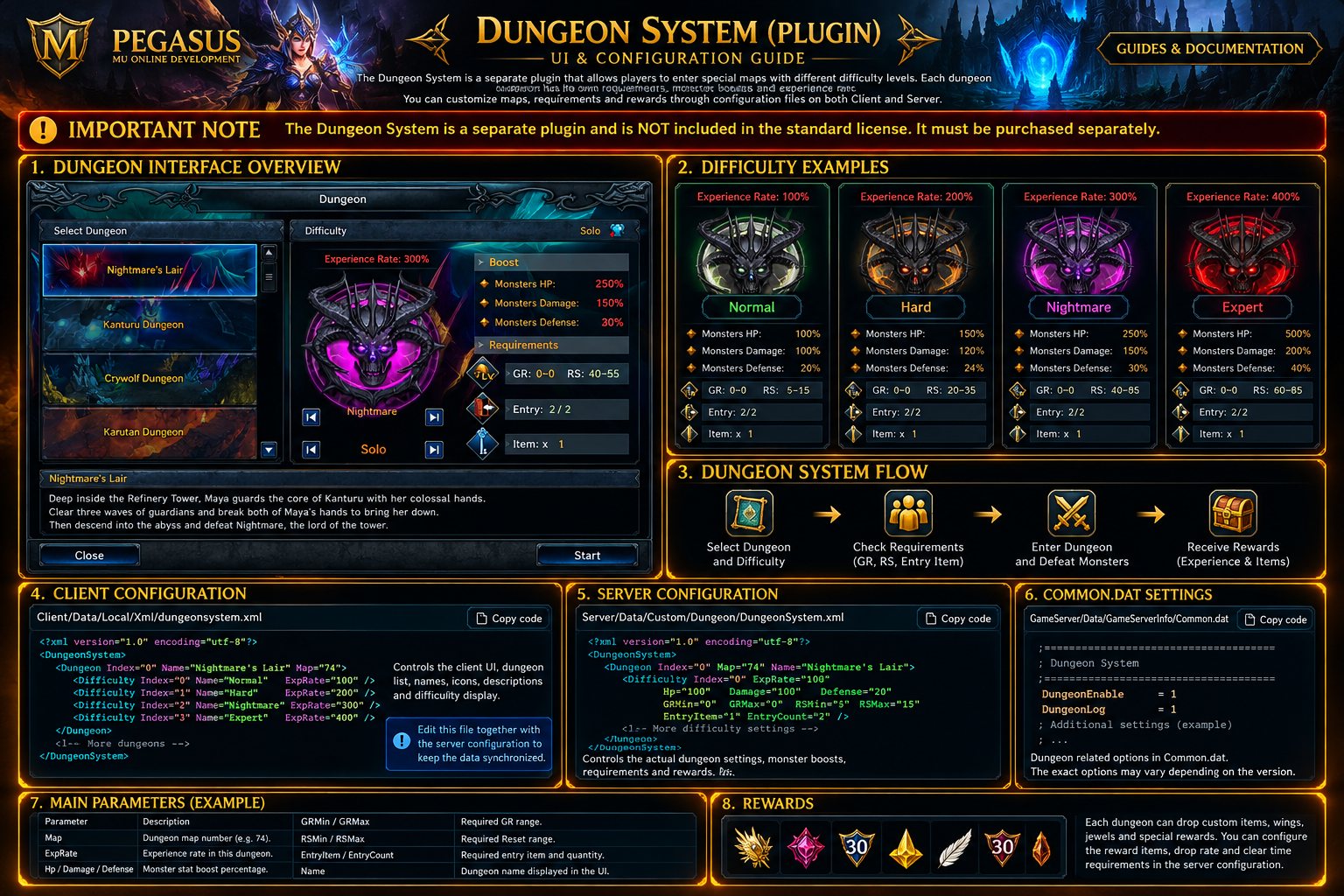
Choose a dungeon and difficulty, review monster boosts and entry requirements, then start the challenge. Available dungeons shown include Nightmare's Lair, Kanturu Dungeon, Crywolf Dungeon and Karutan Dungeon.

1. Dungeon interface overview

Illustrated Pegasus Dungeon System guide
Dungeon System — illustrated interface and difficulty overview

2. Difficulty comparison — Nightmare's Lair

DifficultyEXPMonster HPDamageDefenseReset (RS)
Normal100%100%100%20%5–15
Hard200%150%120%24%20–35
Nightmare300%250%150%30%40–55
Expert400%500%200%40%60–85

Values are transcribed from the four supplied in-game screenshots. All four examples show Solo mode, GR 0–0, 2/2 entries and one required item. The values may differ for other dungeons or server configurations.

3. Dungeon selection

Nightmare's Lair

Four illustrated difficulties: Normal, Hard, Nightmare and Expert.

Kanturu Dungeon

Selectable from the dungeon list.

Crywolf Dungeon

Selectable from the dungeon list.

Karutan Dungeon

Selectable from the dungeon list.

4. Requirements and boosts

The interface displays experience rate, monster HP, damage and defense, Grand Reset (GR), Reset (RS), remaining entries and required item quantity. Check the requirements for the selected difficulty before starting.

5. Configuration notes

The Dungeon plugin may have separate configuration files depending on its release. No verified XML paths or configuration schema were provided, so this guide does not invent file names or attributes. Consult the plugin package before changing settings.

LICENSE NOTICE

Dungeon is a separately sold plugin and must be purchased independently of the standard license.